Data Groups
With few exceptions, data groups must be defined in a device template file in order for them to be available for use on a remote device. Which data groups are defined by a device template file depends on protocol, device type, and unique configuration.
CygNet distributes sample device template files for its EIEs, each of which typically serves one or more hardware models along with applicable firmware. Therefore, the data groups described below are only those data groups defined by CygNet in sample device template file(s). Your template(s) might not include some of the data groups described below. Device template files exist to enable users to customize device configurations; however, CygNet is not responsible for changes made by users.
For information about data group definitions and device template files, see Device Template Files.
For more information about data group dependencies, see Data Group Dependencies.
Device-Specific Data Groups
A device-specific data group defined in the device template file (.dtf) includes item IDs, which provide the link between CygNet and the OPC server. These data groups can be read and/or written.
Data Group Configuration
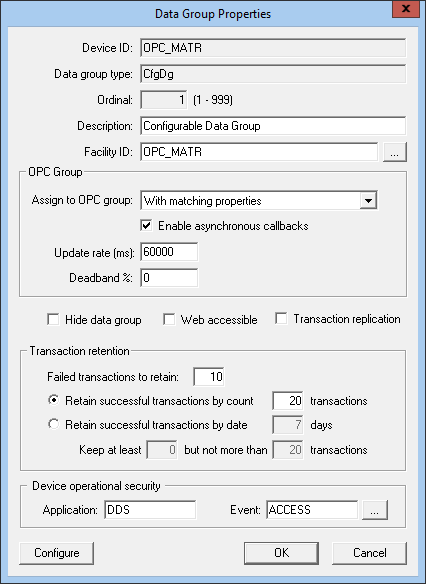
OPC EIE data groups include properties specific only to the OPC device. The Data Group Properties page includes a section for configuring OPC Groups. For more information, see OPC Group Management.
OPC Group
The following table lists and describes properties for the OPC Group section of the Data Group Properties dialog box.
|
Assign to OPC group
|
This option allows a user to pair a data group with an OPC group definition:
- Associated with comm device — All items from the data group are added to the comm device OPC group.
- Associated with remote device — All items from the data group are added to the remote device OPC group.
- With matching properties — Data groups with like properties (on any remote device sharing the same OPC comm device) are combined in a shared OPC group.
- Specific for this data group — An OPC group is created specifically for the data group and will stay active as long as the remote device is enabled.
- None (temporary) — An OPC group is created when the data group is polled and is deleted once the poll completes. Read from device only.
|
|
Enable asynchronous callbacks
|
When checked, the OPC server will push data to the OPC EIE as it obtains changed values from the remote device. From a system standpoint, this data group no longer needs to have polls scheduled through the MSS. This option is only available with the following selections from Assign to OPC group:
- With matching properties
- Specific for this data group
Enable asynchronous callbacks is not available for "Single Item" data groups.
|
|
Update rate (ms)
|
The option selected for Enable asynchronous callbacks determines the parameters available for the data group's update rate (in milliseconds). Default is 60000.
- If callbacks are enabled, the Update rate indicates the maximum rate at which the callback should occur, i.e., the OPC server should initiate a callback no more frequently than the update rate.
- If callbacks are not enabled, the Update rate indicates the minimum rate that the OPC server cache should be updated, i.e., the OPC server should request data from the RTU at least this frequently.
|
|
Deadband %
|
Deadband percentage is an OPC standard capability that requests that an OPC server only report value changes that exceed a configured percentage. Type a percentage value for the OPC group definition. The default value is 0.
|
Polling OPC EIE Data Groups
When polling an OPC EIE data group, the Get button gives the user options to get cached values or fresh (device) values from the OPC server. Cached data is always read synchronously, while device data can be read synchronously or asynchronously. An asterisk next to an option indicates the default option when the Get button is selected without specifying a menu option.
The following image shows an example of the Get button menu options for a data group with the OPC group Specific for this data group assigned.
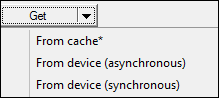
Options in the drop-down menu include (depending on the associated OPC group):
- From cache* — synchronous polling of the cache
- From device (asynchronous) — asynchronous polling of the device (available for all OPC Groups)
- From device (synchronous) — synchronous polling of the device (available for all OPC Groups)
These options can also be controlled with UIS commands using the ReadDevice and SyncIO parameters. For more information, see UIS Command Component Parameters .

 Click here to see an example of a device-specific data group

